EN
EN

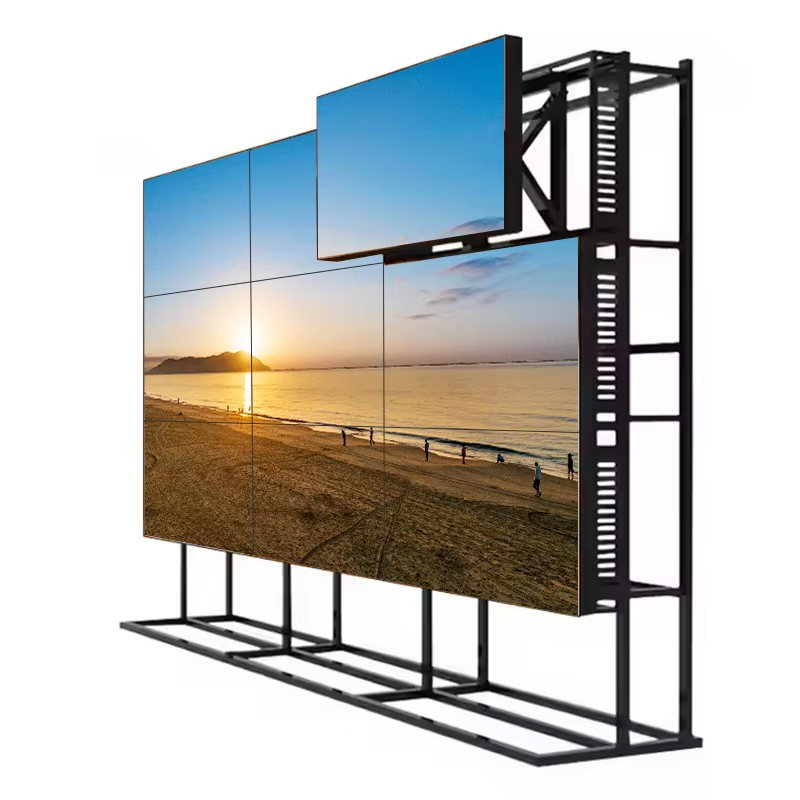
Core Technology and Panel Types Behind LCD Splicing Screens
How LCD Splicing Enables Seamless Large-Scale Visual Integration
LCD splicing tech gets around those old size problems by putting together several panels into one big screen. The system uses smart electronics to split up whatever's being shown on the screen across these different panels, keeping everything lined up properly thanks to some pretty tight sync stuff happening behind the scenes. Some neat optical tricks like micro-lens refraction help hide those annoying borders between panels too. We're seeing systems now that can get down to less than 1mm spacing between panels according to Display Daily from last year, so images look almost continuous. Getting the brightness right matters a lot too - most setups keep things within about 5% variation and stick with the standard 6500K color temp across all panels. This kind of consistency is super important for places like control rooms where operators need to see everything clearly without distractions. Put it all together and we can create massive displays over 300 inches wide without losing any of that 4K or UHD sharpness that makes such a difference in professional settings.
TN vs. VA vs. IPS Panels: Trade-offs in Viewing Angles, Color Fidelity, and Response Time for LCD Splicing Screens
Panel selection fundamentally shapes visual performance in LCD splicing deployments. Each technology offers distinct trade-offs:
| Characteristic | TN (Twisted Nematic) | VA (Vertical Alignment) | IPS (In-Plane Switching) |
|---|---|---|---|
| Viewing Angles | Limited (<60° usable) | Moderate (≈120°) | Superior (178°/178°) |
| Color Fidelity | 65% sRGB coverage | 85% NTSC | >95% Adobe RGB |
| Response Time | 1ms (fastest motion handling) | 4–8ms | 5–10ms |
| Contrast Ratio | 700:1 | 3000:1 | 1000:1 |
For budget conscious setups where people only look straight ahead like simple monitoring displays, TN panels work fine but they tend to mess with colors when viewed from any angle other than head on. VA panels are better for places where lighting is dim because they produce much darker blacks and stronger contrasts. That's why security cameras often use them. IPS technology rules the roost in situations that really matter and get lots of foot traffic such as stores displaying products or control centers where operators need to see everything clearly. These panels have super wide viewing angles so folks can see what's happening even if they're not standing directly in front of the screen. Colors stay consistent too about 95% match between different panels at around 170 degrees viewing angle which matters a lot when putting together big video wall setups. Calibration remains stable across these larger installations making IPS the go to choice for critical operations.
Critical Technical Specifications for LCD Splicing Screen Selection
Bezel Width, Resolution, and Brightness: Matching Metrics to Environment (Command Center, Conference Room, Retail)
When choosing an LCD splicing screen, it's important to match key specs with what the environment actually needs. The bezel width, which is basically the space between each panel, needs to be as small as possible so images look continuous. For places like command centers where people need to see everything at once, getting something below 0.5mm makes all the difference in maintaining those critical sightlines for real time monitoring. Resolution matters too depending on what the display will show. Most stores go with 4K panels when showcasing products because customers notice the sharpness, and control rooms benefit from that level of detail when displaying complex data streams. Brightness levels measured in nits are another consideration. Conference rooms generally work fine with around 500-700 nits, but stores located near windows or in bright areas need at least 700 nits to make sure content remains visible even during daylight hours.
| Environment | Recommended Bezel Width | Resolution Preference | Ideal Brightness Range (nits) | Key Benefit |
|---|---|---|---|---|
| Command Center | < 0.5mm | High (e.g., 4K) | 400–600 | Minimizes distractions for critical monitoring |
| Conference Room | < 1.0mm | Full HD or higher | 500–700 | Ensures clarity in varied lighting |
| Retail | Ultra-narrow | 4K | 700+ | Enhances engagement in high-traffic areas |
This targeted specification alignment balances performance, longevity, and cost—avoiding unnecessary over-engineering.
Contrast Ratio, Thermal Stability, and 24/7 Operational Reliability — Industrial-Grade LCD Splicing Screen Benchmarks
The industrial LCD splicing screens we talk about here aren't built just for showy performance during tests. They need to keep going strong day after day in real world conditions. When it comes to security monitoring, getting at least a 3000:1 contrast ratio matters a lot. The difference between shades can mean spotting threats earlier or gathering better evidence later on. These displays stay stable even when temperatures swing from freezing cold to hot summer days (-10°C all the way up to 50°C). No warping panels, no colors shifting unexpectedly, no timing issues messing up production lines or control rooms near construction sites. Manufacturers looking for genuine round-the-clock operation include smart cooling systems, adjustable backlights that save energy without sacrificing visibility, and special features that fight screen burn-in. All these design choices cut down on repair bills over time and keep operations running smoothly without those frustrating unexpected shutdowns that cost money and productivity.
Splicing Configuration Strategies Aligned with Real-World Applications
Synchronous (Grid) vs. Irregular (Custom) Splicing: Flexibility, Content Mapping, and Integration Complexity
Most professionals stick with grid-based setups where displays line up neatly in rows and columns. These arrangements make life easier when it comes to mapping content across screens, cut down on time spent calibrating everything, and keep those annoying bezels aligned predictably. That's why we see them so often in places like corporate reception areas, TV news studios, and control rooms where reliability matters most. On the flip side, irregular layouts that bend around corners, form L-shapes, or just look completely different from standard grids bring something special to building design. They let architects get creative but come at a price. Specialized hardware is needed to handle the video processing, plus custom software for content mapping. Engineers have to work extra hard to compensate for bezel gaps and manage how heat affects display performance over time. Even though newer splicing processors are making these custom arrangements more feasible, they still create headaches during installation and ongoing maintenance. The alignment tends to drift after months of constant use, which can be a real pain point for facility managers.
Use-Case Mapping: Why 2×2 LCD Splicing Screens Suit Collaborative Spaces, While 3×3+ Configurations Excel in Surveillance and Digital Signage
The 2x2 setup works really well for collaboration areas because it gives enough screen space around 100 to 140 inches diagonally without making tiny meeting rooms feel cramped. People sitting anywhere from ten to fifteen feet away can still see everything clearly, plus there's less bezel getting in the way when folks share papers or work on whiteboard style stuff. When we need something bigger though, like 3x3 setups or larger, those become necessary for handling complicated visualizations with multiple sources. Command centers for surveillance absolutely depend on these big grids to watch all those camera feeds at once. Airports, sports venues, and transportation stations also make good use of them since their massive size and sharp resolution let important information stand out even from far distances. How far people are looking at screens matters a lot along with how much content needs to fit and what kind of light surrounds the display area. Take those bright retail storefronts facing direct sunlight for instance they need both big displays and super bright panels over 1200 nits to keep text readable and colors popping despite harsh conditions.
Frequently Asked Questions (FAQ)
What is LCD splicing technology?
LCD splicing technology involves combining multiple LCD panels to create a larger display, with synchronized content displayed across panels for seamless visual integration.
Which panel type offers the best color fidelity for LCD splicing screens?
IPS panels offer superior color fidelity for LCD splicing screens, with over 95% Adobe RGB coverage and wide viewing angles.
What are the recommended specifications for a command center LCD splicing screen?
For a command center, a bezel width below 0.5mm, 4K resolution, and brightness levels between 400–600 nits are recommended.
How is a 2x2 LCD splicing screen configuration suited for collaborative spaces?
A 2x2 configuration provides ample screen space without overwhelming smaller rooms, facilitating clear visibility for collaborative activities.